Configuring the Line Pack Device
The Device page is used to configure general information about the device such as the Line Pack device name, description, transaction logging, and device security. You can also execute the UIS command (CALCULATE or VCALCULATE) to perform a Line Pack or Mass Balance calculation from this page by clicking Execute Calculation.
|
Click the thumbnail to see |
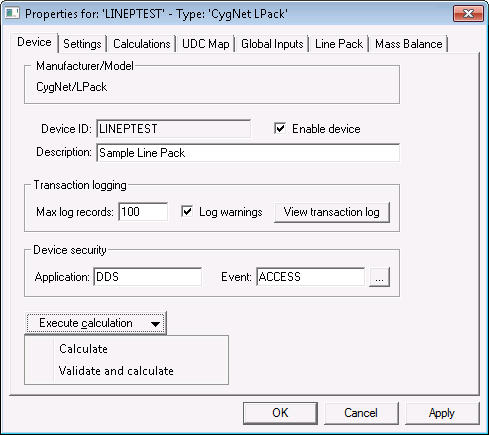
The properties for each section of this page are described below. See the following subsections below for more information:
Device settings
| Property | Description | ||||||
|---|---|---|---|---|---|---|---|
|
Device ID |
The unique identifier of an instance for this device. This free-form name must be unique in the DDS and the FAC. That is, it must be a name not used by any other communication device, import/export device, remote device, or facility. CygNet naming standards for device ID are as follows:
|
||||||
|
Enable device |
Select whether to enable or disable the device. The default setting is disabled. If an invalid configuration is detected, the device will automatically be disabled. The device can be re-enabled after the invalid configuration is fixed. |
||||||
|
Description |
A free-form description of the device. 32 character maximum. |
Transaction logging
Each UIS command executed by the Line Pack driver will generate a single transaction log. Within that single log entry will be the results of each pack segment calculation.
| Property | Description |
|---|---|
|
Max log records |
The maximum number of transaction history records that can be maintained for the device. Each UIS command executed by the device will generate a single transaction log. If the device is setup for active monitoring, one transaction will be created whenever a new file is detected. If multiple files are detected at the same time, it will still result in one transaction. |
|
Log warnings |
Check this box to log the occurrence of all warnings. |
|
View transaction log |
Click to view transaction and status log entries. |
Device security
The security fields define the application and event that controls which user(s) can edit and perform calculation. See Component-Level Security - Text Import Device for more information about component-level security.
| Property | Description |
|---|---|
|
Application |
Defines the ACS security application name used to validate the users of this device. See Applications, Events, Permissions. |
|
Event |
Defines the ACS security event used to validate users of this device. Click … to select the security event. See Applications, Events, Permissions. |
Execute calculation
Click Execute calculation to manually initiate a Line Pack or Mass Balance calculation. Options include:
- Calculate — sends the CALCULATE command to the Line Pack device to perform all calculations.
- Validate and calculate — sends the VCALCULATE command to the Line Pack device. This command will first validate for missing and new segments, facilities, and points, and then perform all calculations.
Execute a calculation by sending a UIS command of the type CALCULATE ("Calculate") to the Line Pack driver. A second UIS command VCALCULATE ("Validate and calculate") can be issued to first validate segments, facilities, and points, and then perform the Line Pack and Mass Balance calculations. The recommended configuration is to initiate the CALCULATE command, and then if you know there are changes to the system, initiate the VCALCULATE command, and then repeat once an hour to make sure the Line Pack driver has the most up-to-date database entities in its cache.
These UIS commands can be scheduled via the MSS or executed directly on the Device page of the device editor.


